Production-Ready Blogging Platform (Spring Boot, AWS, Docker)
🌐 Live Demo
GitHub Repository
Overview
Designed and deployed a full-stack content platform with secure authentication, role-based access control, and cloud-native deployment.
Built with Spring Boot and containerized using Docker, the system includes user management, content workflows, and production-grade security practices (Spring Security, password handling, CSRF protection).
Deployed on AWS EC2 with environment-based configuration and secure secret management.
Key Features
✅ Dynamic Blog System
- Paginated blog post grid with thumbnails, titles, dates, categories, and tags.
- Clean URL routing using post slugs (e.g.,
/blog/java-spring-boot-intro). - Full-text post view with syntax-highlighted code blocks and embedded media.
- Filter posts by category or tag via interactive UI.
User Engagement
- Comment system allowing:
- Registered users to comment after login.
- Guests to comment with name and email.
- Reply functionality for threaded discussions.
- Edit and delete own comments (with session validation).
- Admin moderation capabilities.
Secure Authentication
- Role-based access control: Admin, Editor, Author, Subscriber.
- Hierarchical permissions (e.g., Admin inherits all lower roles).
- Login, logout, registration, and “Remember Me” functionality.
- “Forgot Password” flow with email reset token.
- Custom
LoginSuccessHandlerto track last login time.
User Profiles
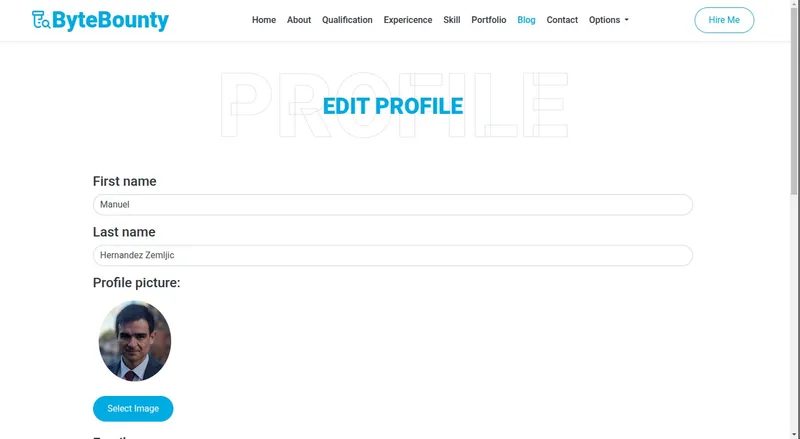
- Edit personal information (name, bio, social links).
- Upload and manage profile picture.
- View own posts and comments.
🖋️ Rich Content Management
- WYSIWYG editor (Summernote) for creating and editing blog posts.
- Support for:
- Text formatting (bold, italic, lists, headings).
- Image uploads with server-side storage.
- Code block embedding with Prism.js highlighting.
- Draft saving and scheduled publishing.
🛠️ Admin Dashboard
- Full CRUD operations for blog posts.
- User management: view, edit roles, disable accounts.
- Comment moderation: approve, edit, delete.
- Real-time activity monitoring.
🏗️ Architecture & Technologies
🖥️ Frontend
| Technology | Purpose |
|---|---|
| Thymeleaf | Server-side HTML templating |
| Bootstrap 5 | Responsive UI framework |
| JavaScript/jQuery | DOM manipulation & interactivity |
| Summernote | Rich text editor |
| Prism.js | Code syntax highlighting |
⚙️ Backend
| Technology | Purpose |
|---|---|
| Java 17 | Core language |
| Spring Boot | Web framework & dependency injection |
| Spring MVC | REST and form handling |
| Spring Data JPA | ORM & database interaction |
| Spring Security | Authentication & authorization |
| MySQL | Relational database |
| BCrypt | Password hashing |
☁️ Deployment & DevOps
| Technology | Purpose |
|---|---|
| Docker | Containerization |
| AWS EC2 | Cloud hosting |
| Docker Secrets | Secure credential management |
UI/UX Design
Leveraged premium-quality templates from HTMLCodex.com:
- FreeFolio – For the personal portfolio layout.
- Bloggy – For blog structure and styling.
These templates were customized to ensure visual consistency across the static portfolio and dynamic blog, creating a seamless user experience.
🧩 Challenges & Solutions
| Challenge | Solution |
|---|---|
| Summernote image upload conflicts | Implemented custom file upload handler with UUID-named files and session-safe deletion logic |
| Role hierarchy in Spring Security | Used RoleHierarchyImpl to define parent-child role relationships |
| CSRF protection with Thymeleaf forms | Integrated th:action with Spring’s CSRF token auto-inclusion |
| Secure credential storage | Used Docker secrets mounted as files, not environment variables |
Future Improvements
- Email notifications for new comments (via JavaMail).
- Newsletter subscription system with confirmation workflow.
- CI/CD pipeline using GitHub Actions.
- Orchestration with Docker Swarm or Kubernetes.
- Admin dashboard SPA using React/Vue for better UX.
Project Structure (Simplified)
      src/
├── main/
│   ├── java/com/example/blog/
│   │   ├── controller/
│   │   ├── model/
│   │   ├── repository/
│   │   ├── service/
│   │   └── security/
│   └── resources/
│       ├── templates/
│       ├── static/
│       └── application.yml
└── Dockerfile
How to Run Locally
- Clone the repository:
bash1
git clone https://github.com/yourusername/java-blog-project.git
Set up MySQL database and update application.yml. Build with Maven: ./mvnw clean package
Run with Docker: docker build -t java-blog . docker run -p 8080:8080 java-blog
Access at http://localhost:8080
Conclusion
This project demonstrates my ability to design and implement a secure, scalable, and maintainable full-stack web application using enterprise-grade Java technologies. It blends professional frontend design with robust backend logic, showcasing skills in authentication, database modeling, API design, deployment, and UX optimization — all essential for modern web development.
Ideal for developers seeking to build content-driven platforms with Java, this architecture serves as a strong foundation for blogs, CMS, or enterprise dashboards.