Java Blog Project: Full-Stack Portfolio Website with Dynamic Blog Functionality
🌐 Live Demo
GitHub Repository
Overview
This project showcases a professional portfolio website integrated with a fully dynamic blog system built using modern Java enterprise technologies. While the main site (Home, About, Skills, Portfolio, Contact) provides a static yet responsive presentation of my work, the blog functions as a full CRUD web application, enabling content creation, user interaction, and secure administration.
The backend is powered by Spring Boot with JPA/Hibernate for ORM, MySQL for data persistence, and Spring Security for robust authentication and role-based authorization. The frontend uses Thymeleaf for server-side rendering, Bootstrap 5 for responsive design, and enhanced UX tools like Summernote (WYSIWYG editor), Prism.js (syntax highlighting), and jQuery.
Deployment is containerized using Docker and hosted on AWS EC2, ensuring scalability and environment consistency.
Key Features
✅ Dynamic Blog System
- Paginated blog post grid with thumbnails, titles, dates, categories, and tags.
- Clean URL routing using post slugs (e.g.,
/blog/java-spring-boot-intro). - Full-text post view with syntax-highlighted code blocks and embedded media.
- Filter posts by category or tag via interactive UI.
User Engagement
- Comment system allowing:
- Registered users to comment after login.
- Guests to comment with name and email.
- Reply functionality for threaded discussions.
- Edit and delete own comments (with session validation).
- Admin moderation capabilities.
Secure Authentication
- Role-based access control: Admin, Editor, Author, Subscriber.
- Hierarchical permissions (e.g., Admin inherits all lower roles).
- Login, logout, registration, and “Remember Me” functionality.
- “Forgot Password” flow with email reset token.
- Custom
LoginSuccessHandlerto track last login time.
User Profiles
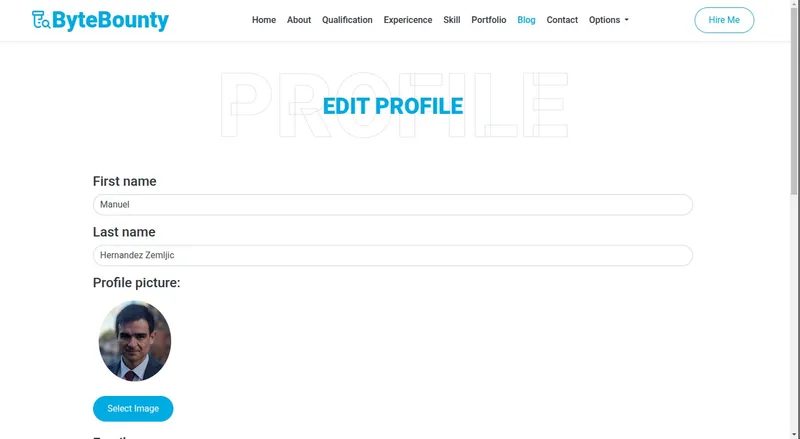
- Edit personal information (name, bio, social links).
- Upload and manage profile picture.
- View own posts and comments.
🖋️ Rich Content Management
- WYSIWYG editor (Summernote) for creating and editing blog posts.
- Support for:
- Text formatting (bold, italic, lists, headings).
- Image uploads with server-side storage.
- Code block embedding with Prism.js highlighting.
- Draft saving and scheduled publishing.
🛠️ Admin Dashboard
- Full CRUD operations for blog posts.
- User management: view, edit roles, disable accounts.
- Comment moderation: approve, edit, delete.
- Real-time activity monitoring.
🏗️ Architecture & Technologies
🖥️ Frontend
| Technology | Purpose |
|---|---|
| Thymeleaf | Server-side HTML templating |
| Bootstrap 5 | Responsive UI framework |
| JavaScript/jQuery | DOM manipulation & interactivity |
| Summernote | Rich text editor |
| Prism.js | Code syntax highlighting |
⚙️ Backend
| Technology | Purpose |
|---|---|
| Java 17 | Core language |
| Spring Boot | Web framework & dependency injection |
| Spring MVC | REST and form handling |
| Spring Data JPA | ORM & database interaction |
| Spring Security | Authentication & authorization |
| MySQL | Relational database |
| BCrypt | Password hashing |
☁️ Deployment & DevOps
| Technology | Purpose |
|---|---|
| Docker | Containerization |
| AWS EC2 | Cloud hosting |
| Docker Secrets | Secure credential management |
UI/UX Design
Leveraged premium-quality templates from HTMLCodex.com:
- FreeFolio – For the personal portfolio layout.
- Bloggy – For blog structure and styling.
These templates were customized to ensure visual consistency across the static portfolio and dynamic blog, creating a seamless user experience.
🧩 Challenges & Solutions
| Challenge | Solution |
|---|---|
| Summernote image upload conflicts | Implemented custom file upload handler with UUID-named files and session-safe deletion logic |
| Role hierarchy in Spring Security | Used RoleHierarchyImpl to define parent-child role relationships |
| CSRF protection with Thymeleaf forms | Integrated th:action with Spring’s CSRF token auto-inclusion |
| Secure credential storage | Used Docker secrets mounted as files, not environment variables |
Future Improvements
- Email notifications for new comments (via JavaMail).
- Newsletter subscription system with confirmation workflow.
- CI/CD pipeline using GitHub Actions.
- Orchestration with Docker Swarm or Kubernetes.
- Admin dashboard SPA using React/Vue for better UX.
Project Structure (Simplified)
      src/
├── main/
│   ├── java/com/example/blog/
│   │   ├── controller/
│   │   ├── model/
│   │   ├── repository/
│   │   ├── service/
│   │   └── security/
│   └── resources/
│       ├── templates/
│       ├── static/
│       └── application.yml
└── Dockerfile
How to Run Locally
- Clone the repository:
bash1
git clone https://github.com/yourusername/java-blog-project.git
Set up MySQL database and update application.yml. Build with Maven: ./mvnw clean package
Run with Docker: docker build -t java-blog . docker run -p 8080:8080 java-blog
Access at http://localhost:8080
Conclusion
This project demonstrates my ability to design and implement a secure, scalable, and maintainable full-stack web application using enterprise-grade Java technologies. It blends professional frontend design with robust backend logic, showcasing skills in authentication, database modeling, API design, deployment, and UX optimization — all essential for modern web development.
Ideal for developers seeking to build content-driven platforms with Java, this architecture serves as a strong foundation for blogs, CMS, or enterprise dashboards.